

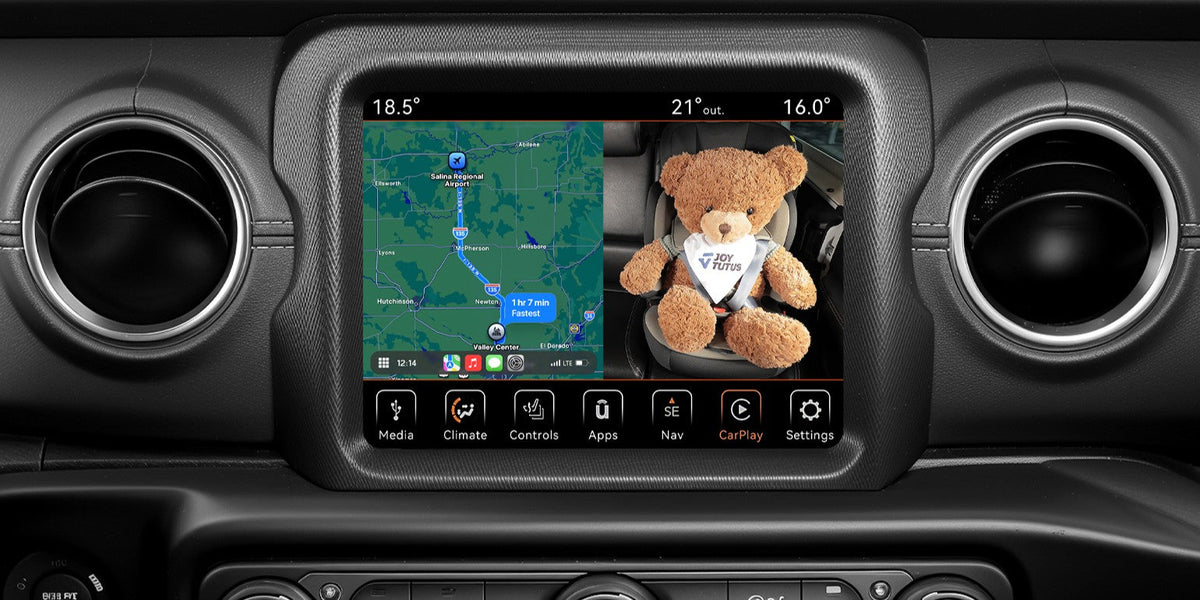
If you drive with a baby in the back seat, you know how hard it is to watch the road while worrying about the child behind you. A wireless car baby monitor lets you check on your little one with a quick glance, so you do not have to turn around. For drivers who use Apple CarPlay, a wireless carplay baby monitor goes a step further. It shows the camera view on the screen already built into your dashboard, so there is no extra display stuck to your windshield.
Still, not every wireless baby monitor for car use is the same. Some only work with certain phones. Some need regular charging. Others give a grainy picture after dark. This guide explains what to look for, what to double check, and how to match a monitor to your vehicle and your family.
What Is a Wireless Car Baby Monitor with CarPlay?
A wireless car baby monitor is a camera system that lets the driver see a child in the rear seat. The CarPlay version sends that view to your car’s own screen.
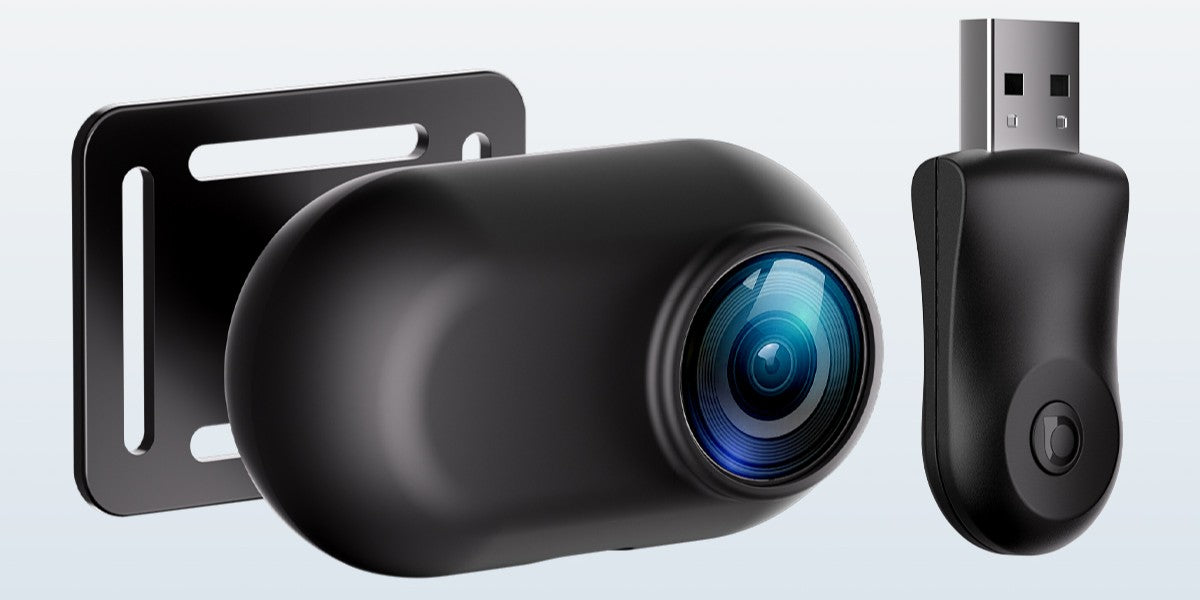
Most systems have two parts. A small camera mounts near the child seat, usually on the headrest. A receiver plugs into the car’s USB data port and connects to your iPhone. The camera view then appears on the same display you use for maps, calls, and music. Because there is no extra screen, the dashboard stays tidy and you only have one place to look.
It helps to know what “wireless” means here. In most CarPlay models, it means the link between your phone and car has no cable. The camera itself may still need a power cable, which we cover below. A wireless baby car camera in this category is wireless on the display side, not always on the power side.
How a Wireless CarPlay Baby Monitor Shows the Back Seat
Good models let you decide how much of the screen the camera uses. That choice matters when you are following directions on a long drive.
- Full CarPlay, with the camera hidden until you need it
- Full-screen camera, for a closer look
- Split screen, with the map and camera side by side
- Picture-in-picture, with a small camera window over the map
Split screen and picture-in-picture are the most practical. You can keep following your route and still check on the baby.
Check Compatibility Before Buying a Wireless Baby Monitor for Car Use
Compatibility is the first filter, and it can save you from a return later. This type of monitor has clear limits, so a few quick checks are worth your time.
A simple test works well. Plug your iPhone into the car’s USB port with an Apple cable. If CarPlay appears on the factory screen, your car meets the main requirement. Then run through this list:
- Your car has factory-installed wired Apple CarPlay
- You use an iPhone, not an Android phone
- The USB port carries data, because a charge-only port will not work
- Your car brand is supported, since some makes are excluded
Key Features of a Good Wireless Baby Car Camera
Once compatibility is clear, look at picture quality, night performance, and fit. These are the things you will notice on every drive.
Clear 1080P Video from a Wireless Car Camera for Baby
Sharp video helps you tell whether your baby is asleep, fussy, or has dropped a toy. For most families, 1080P is a practical target. Resolution is not the whole story, though. The picture also has to stay clear in bright sun, shade, and tunnels. Try to watch real in-car footage instead of studio photos, and look for lag or flicker. The camera should give you a steady image that makes sense in one quick glance.
Night Vision for a Baby Car Camera Wireless System
Back seats get dark early, and you should never need to switch on the cabin light just to see your child. Look for automatic infrared night vision that turns on by itself. A black and white picture in the dark is normal. What matters is that the face and upper body stay easy to see. In any baby car camera wireless setup, the switch between day and night mode should be smooth, without flickering in patchy light.

Wide View and Viewing Modes in a Wireless Car Baby Monitor
A wide lens shows more of the seat, but it should not make your baby look tiny. A 150° view can help when you have two children, or a child and a pet, in the same row. Try to frame the face and upper body rather than the whole cabin. Then check the screen options. If the camera supports split screen or picture-in-picture, you will not have to choose between your map and your baby.
Easy Mounting for a Wireless Baby Car Camera
A camera that slips or points the wrong way is not much help, so mounting matters. Headrest shapes vary a lot between vehicles. Look for an adjustable angle and more than one mounting option. It also helps if the camera can face the rear or the front, because your child will change seats as they grow. An install that needs no drilling is a bonus.
Know the Power Needs of a Wireless Car Camera for Baby
Wireless does not always mean no cables, so read the power details before you order. This is where many buyers get surprised.
Many CarPlay cameras have no built-in battery. They need constant 5V USB power from a car USB port, a USB adapter, or a portable power bank. That has one clear upside: there is no battery to charge before each trip. The trade-off is a power cable that has to reach the camera.
Measure the cable route, not the straight distance. In a crew cab truck, a three-row SUV, or a minivan, the path often runs longer than you expect because it follows seats and trim. Keep the cable away from pedals, doors, seat tracks, and your child’s reach.
Wireless CarPlay Baby Monitor vs. Traditional Monitor
Both formats do the same basic job, but they suit different cars and habits. This table shows the main differences.
|
Factor |
CarPlay Monitor |
Traditional Monitor |
|
Display |
Your car’s CarPlay screen |
A separate screen |
|
Dashboard space |
No new screen |
One more screen to mount |
|
Phone |
iPhone with wired CarPlay |
Usually no phone needed |
|
Vehicle |
Factory-wired CarPlay required |
Works in most vehicles |
|
Android |
Not supported |
Often supported |
|
Setup |
Plug in receiver, mount camera |
Mount camera and monitor |
|
Power |
Camera needs USB power |
Varies by model |
Neither option wins every time. If your car has wired CarPlay and you want a clean dashboard, the CarPlay type is a strong fit. If you switch between cars or phones, a standalone monitor may be easier. For a deeper look, read our guide to traditional baby car monitors vs. CarPlay baby monitors.
Buying Checklist for a Wireless Car Baby Monitor
Use this list to compare any model before you pay. If a product misses more than one point, keep looking.
- Works with your car and your phone
- 1080P video that stays clear in sun and shade
- Automatic night vision
- A view that covers every child seat you use
- Split screen or picture-in-picture
- A mount that fits your headrests
- A clear power plan and a cable long enough for your vehicle
- A fair return policy and warranty
Finish all camera and screen adjustments before you drive. A monitor is a tool for quick checks, and it does not replace safe driving. If your baby needs attention, pull over.
Cabin Connect: A Wireless CarPlay Baby Monitor to Consider
To see how these features fit together, look at the Joytutus Cabin Connect Wireless CarPlay Baby Monitor. It is a useful example, and it also shows the limits you should expect.
The kit includes a wireless CarPlay receiver and a 1080P rear-seat camera with a 150° wide-angle lens. It has automatic infrared night vision and four viewing modes: full CarPlay, full-screen camera, split screen, and picture-in-picture. You can mount the camera with a headrest-post bracket or a strap plate. It comes with a 2-year limited warranty and 30-day returns.

On the other side, it needs a factory-wired CarPlay and an iPhone running iOS 10 or later. It does not support Android, BMW, or Tesla vehicles. The camera has no battery and uses a 9.8 ft USB power cable. The receiver can remember two iPhones, but only one can be connected at a time. You can browse more options in the Joytutus CarPlay collection.
Final Thoughts
The best monitor is the one that fits your car, your phone, and your daily drive. Start with compatibility, because it decides everything else. Then look for sharp 1080P video, automatic night vision, a useful wide view, and a mount that stays put. Finally, check the power setup so there are no surprises on installation day.
A wireless carplay baby monitor keeps your dashboard simple and gives you a quick look at the back seat. A standalone unit may be the better pick if you use Android or share cars with other drivers. Whichever you choose, treat it as a quick-glance helper, never as a replacement for careful driving. Joytutus builds travel gear for drivers who want joy and safety all the way, and you can explore more at Joytutus.
FAQs
Q1: Can I use a wireless baby car camera with my Android phone?
Not with this type. CarPlay monitors are made for iPhones and cars with factory-wired CarPlay. Android Auto is not supported, so choose a traditional monitor instead.
Q2: Do I need Wi-Fi or an app for a wireless car baby monitor?
No home Wi-Fi or data plan is needed for CarPlay models, because they run through the car’s USB connection. The Cabin Connect also needs no separate app, since the view appears on your CarPlay screen.
Q3: Can I use navigation and see my baby at the same time?
Yes. Split screen and picture-in-picture show the map and the camera together. You can also switch to full-screen camera for a closer look.

Leave a comment
All comments are moderated before being published.
This site is protected by hCaptcha and the hCaptcha Privacy Policy and Terms of Service apply.